

No matter how long you’ve been collecting, there will be times when you run into something in this hobby you’ve never seen before, an that’s when knowing how to identify baseball cards that are new to you will come in handy.
That goes for new collectors, veteran collectors, dealers, investors, and even interested bystanders — there’s always something new to learn, and there will always be cards that present mysteries to be solved.
It’s your job to sharpen your cardboard detective skills so you’re ready when that time comes, and this handy guide can get you started.
So …
Here are some of the tools that will help you positively identify just about any baseball card (or other sports card) you may encounter.
(This post is part of a complete series on How to Sell Baseball Cards.)
The Card Itself
The truth is, identifying a baseball card is pretty easy most of the time, even if you don’t have much prior knowledge of cards … like if your long lost great auntie Bertie, twice removed and three times resuscitated, leaves you a box of “old” cards in her will after that fourth time. Let’s say that one of Bertie’s treasures is this Matt Nokes:
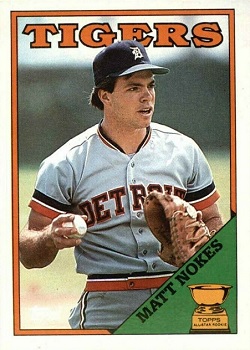
From the card front, you can surmise that this is a Matt Nokes baseball card (duh), and that it was issued by Topps, thanks to that little trophy, which might also tip you off that this is a rookie card.
But you still don’t know what year the card is, and “Topps” may not resonate enough for you to recognize the name as a card manufacturer. Don’t worry, though — that’s a mistake you’ll only make once in this game. And it’s one you can remedy by turning the card over:

There on the back, we see the rest of the story along the right-hand side: “1988 Topps Chewing Gum, Inc.”. So, this is a 1988 Topps Matt Nokes baseball card.
Sometimes, though, the byline won’t be quite so helpful, with the year the hunk of information most often being omitted. In those cases, you can still figure it out — most of the time — by looking at the player stats. Since most cards are issued the year AFTER the season they depict in photos and in numbers, you can usually add one (1) to the last year shown in a player’s stat box to get the year the card was issued.
In the case of Nokes fn this card, we see that 1987 is the most recent year reflected in his line, which again means this is a 1988 Topps card.
But identifying a card is not always that straightforward, especially for obscure older cards or more recent cards, which often exist in many parallel forms and variations. Not only that, but a given player might appear in dozens of different sets in any particular year.
So, what do you do then, when ID’ing a card is not as easy as flipping it over?
Well, you can still take these same steps to get started. Take a look at this Pete Rose card, for example:

If you’ve never seen this type of card before, the front gives you nothing other than “ROSE” and “OUTFIELD” and a signature. So … let’s check out the card back:

Hmmm.
Both the copyright and the stats block lead us to the conclusion that this is a 1972 card. But a 1972 Xograph? I’ve never heard of that card company, and I’ll bet you haven’t either.
So, where to now? Well, how about our old friend?
Google Search
Yep, good old Google search can help us identify baseball cards, too. (And so can Bing, Yahoo, DuckDuckGo, etc.).
In the case of our Pete Rose card, we have a ready made search term.
Here’s what Google says about “1972 Xograph Pete Rose”:

Bingo! Big G tells us right away that this is a 1972 Kellogg’s Pete Rose card. And if that hadn’t worked out? We could have used Google reverse image search to try and match our card with other sightings online, like so …
- Go to images.google.com:

- Click the camera to bring up the image dialogue:

- Switch to the “Upload an image” tab …

- Click “Choose File” and then select the image of your card to upload (you can also drag the file into the text box)
And we have another “Bingo!” …

Google once again delivers us to 1972 Kellogg’s.
If you work through the on-card and Google gauntlets without much success, or if you just want another option, then you can always turn to …
PSA Master Set Checklists
Card grading giant PSA maintains checklists of virtually ever licensed card (and some that are unlicensed) issued during the careers of some of baseball’s best players. They do the same for other sports, too.
Here is the checklist for Pete Rose.
Since we narrowed our mystery card down to a 1972 Rose, we can page through the PSA Master Set checklist to that year, like so …

There’s no “Xograph” on this list, but we can take the cards that are listed and run *those* through Google until we see something familiar … like that 1972 Kellogg’s beauty.

And if the plain old Google results aren’t conclusive enough, you can always switch to the “Images” tab under the search box to see all the photos Google knows about that match your query:

Those Google results almost always include “for sale” listings at various online retailers, including auction marketplaces, but you can also go to those sites directly to do your research.
Indeed, another great tool in your belt for helping identify baseball cards is …
eBay
You can find just about any card you want to add to your collection for sale on eBay, which means you can also use the monstrous online auction house to conduct or augment your research.
To find out about our Rose card, we just head over to eBay.com …

Type in our search term in the “Search for anything” field and hit the Search button:

As with the Google results, we can page through these listings until we find what we’re looking for.
Bonus Tip: If you click the “Sold” checkbox in the “Show only” criteria section at the left of the page, eBay will show you only items that match your search term AND that have sold in recent weeks (usually the last three months). This is a great way to start figuring out the current market value of any given card. Here are the “sold” listings for our “1972 Pete Rose” query.
Other Research Tools
Generally speaking, the tools detailed above will take you along way toward identifying any funky or mysterious baseball cards that may come your way. But they’re not the only game in town … no way!
So, whether you strike out using the above methods or just want some other options, you can always try …
Player Checklists
Like PSA, several other websites maintain player checklists to help you track your collection AND identify the cards you’re researching. Here are a few good ones:
- Baseball Almanac — similar to the PSA Master Set checklists, and you can use them the same way; here is the Rose checklist.
- Trading Card Database — as the name implies, this massive database site maintains lists of all sorts of cards; here is their Pete Rose checklist.
- Beckett Marketplace — ostensibly a place to buy cards, hobby pioneer Beckett uses player checklists as an interface to the cards for sale in their Marketplace; here is the Rose page.
Baseball Card Forums
Long before Twitter and YouTube and TikTok and all the rest, collectors were hanging out and helping each other in online forums. And, today, several forums remain very active, and they are great sources of camaraderie, information … and assistance. Here are a few good ones to peruse when you’re trying to identify a baseball cards.
- Net54baseball: With categories for just about any hobby topic you can imagine, Net54 is fertile ground for research (and rabbit holes).
- Blowout Cards Forums: Though Blowout Cards is known for their breaks and retail presence, they maintain a rich forum where collectors discuss all aspects of the hobby.
- TCDB Forums: Yep, the Trading Card Database shows up here again, but with good reason — their forums are chock full of collectors sharing their wares AND helping each other find the cards they need, and identify the cards they’re unsure of.
Social Media
Choose just about any social media platform you want, and I’ll lay dollars to gum stains there are collectors using the space to further their hobby goals. Here are just a few of the top platforms, along with some ideas about how to use them.